gpui-tunes
A native desktop music player in Rust, in the spirit of classic iTunes.
The problem
Classic iTunes was a very good way to browse a local music library: a sidebar, a column browser and one fast, sortable song table. I wanted that again as a native Linux app, and a reason to learn Rust GUI programming on GPUI, the GPU-rendered UI framework behind the Zed editor.
What I built
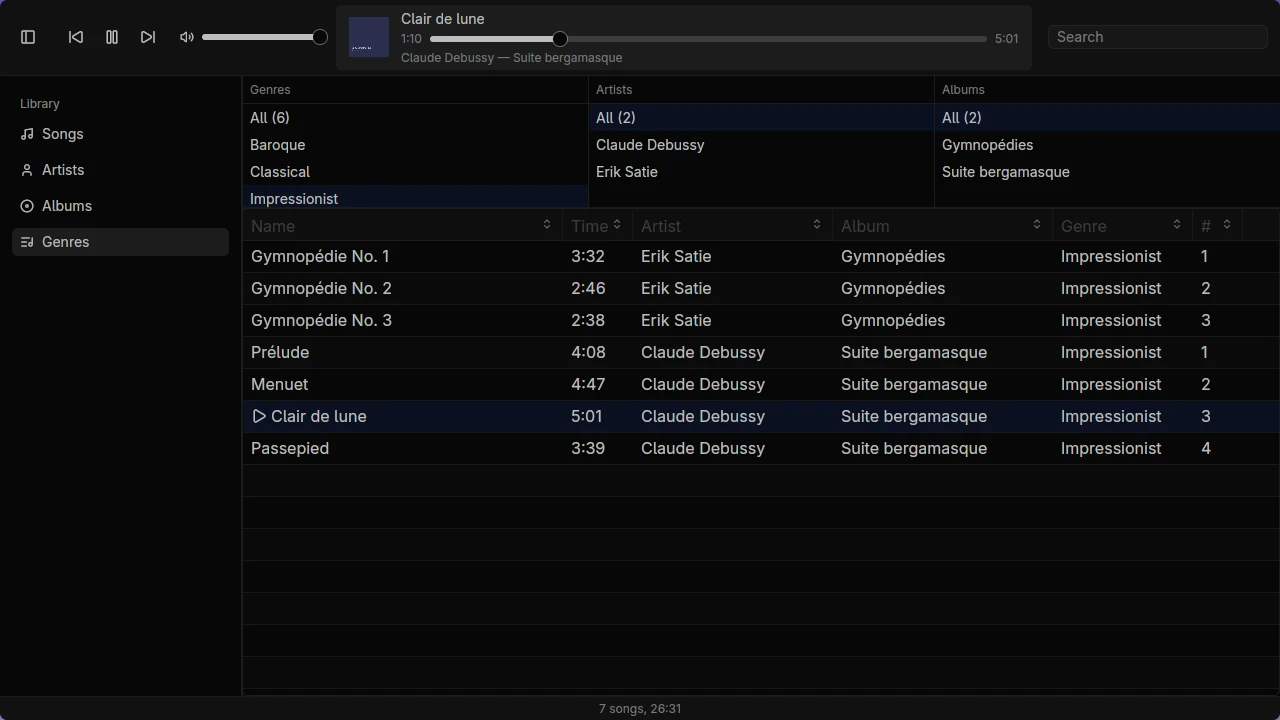
gpui-tunes scans a music folder at startup and shows the library in the classic layout: a sidebar, a genre, artist and album browser, album art, and a song table. It plays M4A (AAC), MP3, WAV, FLAC and OGG Vorbis, with a play queue.
Key decisions
- The core knows nothing about the UI. The workspace has two crates.
tunes-coreholds scanning, library queries, the queue and playback, with no UI dependency.gpui-tunesholds only the views. The core is tested on its own, and the UI could be replaced without touching it. - Unplayable files are listed honestly. Formats the audio stack can’t decode, such as ALAC, are shown in the library but skipped during playback, instead of failing partway through a song.
- Tests that need hardware say so. Player tests open the real default audio device and skip themselves with a message when there isn’t one, so they run on a laptop and don’t break in CI.
What I’d do next
- Finish UI v2, now on its own branch: search, keyboard shortcuts, a status bar and a collapsible sidebar.
- Playlists.
- Watch the library folder for changes instead of scanning only at startup.